
|
The interactive Dashboard is your "homepage" for content like News Articles, Quick Links, and Events. This is the page that all users will see first when the log in, every time, and like the saying goes, first impressions count! Dashboard layouts can be tailored for individual roles, if needed. Changes to the Dashboard layout, including adding, removing, or reordering widgets, is done by the Success Team. |
Jump to section: |
List of the available Widgets
Each box on the dashboard is called a "widget", and each of these widgets are designed to do different things. Not every widget has it's own permission settings, but the dashboard can be customised for an individual role to show/hide certain widgets as needed.
There are a wide variety of different widgets available to add to the dashboard. Some are not shown in the screenshot below, simply because it would be much too big of a screenshot! Check below the screenshot for an all-inclusive list.

1. Featured News Banner: This widget will display any "featured articles", and cycle through in a carousel if there are more than 1. If there are none, the widget will automatically disappear from the dashboard. These banner images directly link to a published news article (see 3).
2. Quick Links: This widget is similar to a "bookmarking" function. Admins can add links to other frequently used pages of the platform (like forms or reports), other websites or systems, or any other website that can be accessed via a web browser.
This widget has 2 levels of permissions: One on each individual link to show/hide links from certain roles or user groups, and one at the system settings level to hide the widget entirely from certain roles.
Tip: There are 3 Quick Links widgets that can be added to the Dashboard.
This is handy when you want to have different sets of quick links, e.g. one for managers, franchisees and everyone/all.
3. News List: This widget displays the published news articles. It will display 11 articles total, with the most recent (or pinned) article at the top in full widget width. Images are optional, and are a configuration setting of the news article itself.
This widget has 2 levels of permissions: One on each individual article, and one at the system settings level to hide the widget entirely from certain roles.
Note: The amount of articles shown in the News List widget cannot be changed. If you would prefer it takes up less space on the dashboard, consider archiving some articles, not using primary images, or moving the widget further down on the dashboard.
4. Events: This is a calendar widget which will display the next upcoming 5 events in the calendar. Clicking on the title of the event will open it's details in a popup, with information like time of day, description, location, attachments, and more.
This widget has 2 levels of permissions: One on each individual event to show/hide events from certain roles or user groups, and one at the system settings level to hide the widget entirely from certain roles.
5. Social Stream: Aka the Facebook Stream, this widget can connect to any publicly accessible Facebook or Twitter account to stream the posts on the dashboard. This does not allow the creation of posts to the linked Facebook or Twitter accounts.
Tip: There are 2 Social Stream widgets that can be added to the Dashboard.
This is handy if you want to stream your brand's Facebook account, but also another relevant account like a regulatory body like Food Standards Australia.
6. Recent Discussions: This widget is part of the Discussion Forums module, which is included in the People Central package. It will display the 6 most recently updated discussions, and which Forum it is in. Click on the discussion title to view the entire discussion.
7. Social Timeline: This widget functions like a mini bulletin board, where users can create posts to be seen and interacted with by other users. It supports emojis, tagging (for notifications), photos, liking and commenting.
This widget has 2 levels of permissions: One to allow/prevent certain Roles from making new posts, and one at the system settings level to hide the widget entirely from certain roles.
Tip: There are 2 Social Timeline widgets that can be added to the Dashboard.
This is handy if one widget is only for Admins to post in, and one is for everyone.
8. Shout Outs: This widget can display either birthdays or work anniversaries, automatically populating based on the dates added to each user profile. It can be customised to show or hide the years or date. It supports liking and commenting.
|
Other widgets available not shown in screenshot:
|
|
Note: The widgets available in the Mobile Apps are Featured News Banner, News List, and Quick Links. More widgets for the Apps coming soon!
The Dashboard Layouts
The Dashboard can have one of a variety of different layouts. Depending on the widgets on your dashboard, some layouts will look better than others.
The Success Team can change the dashboard layout, and help you decide on style and order of widgets that looks good and best suits your brand's needs. Don't hesitate to get in touch if you'd like to try out a different style!
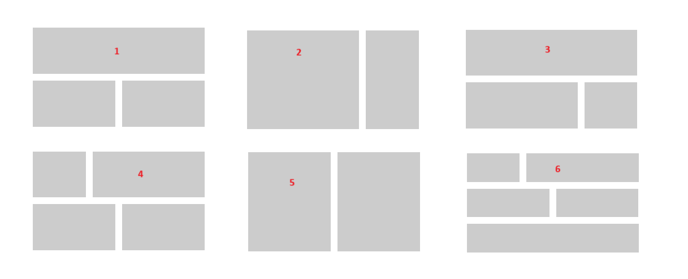
1. Full width section at the top, with 2 equal half sized sections underneath.
2. Split 3/4 width section on the left, and 1/4 width on the right. This is the default and most popular configuration and suits most widgets.
3. Full width section at the top, with split 3/4 width section on the left, and 1/4 width on the right.
4. Split 1/4 width section on the left, and 3/4 width on the right, with 2 equal half sized sections underneath.
5. Equal half sized sections.
6. Split 1/4 width section on the left, 3/4 width on the right, with 2 equal half sized sections underneath, and a full width section underneath that.
Dashboard FAQs
| Question | Answer |
| Can Admins change the Dashboard layout? | No, only the Ideagen Op Central Success Team can. |
| Can Admins add new widgets to the Dashboard? | No, only the Ideagen Op Central Success Team can. |
| Can we add widgets for other modules to the Dashboard? | Only the widgets that have already been built in relation to the other modules, like Discussion Forums and Training. |
| Can Admins change the names of the widgets? | Yes! The option to change a widget name is usually under the ellipses (three dots) on that widget, or in the module settings. |
| Can we add widgets directly underneath the side menu? | No, not at this time. Widgets can be added to the corresponding layout sections only. |
| How do we add a welcome message or video? | The Featured News/News List, or the Rich Media widget are perfect for content like Welcome messages. |
| Can widgets have permissions? | Some can, yes! There are various levels of permissions across the widgets. For example, News Articles and Quick Links have content level permissions as well as widget level permissions. Some others, like Rich Media Widget, only have widget level permissions. Chat to the Success Team for more info. |
| Can I request new widgets be built? | Talk to the Success Team! Whilst we can't promise that every request will be built, we do our best to accommodate as many feature & function requests as we can and will let you know if one of your suggestions or requests gets released. |